We’ve put together these frequently asked questions to provide context and information and also to prompt your requests for more information.
If you have something you’d like added here – or corrected! – please submit a request here (link).
OxFlow Platform
What is OxFlow?
OxFlow is a managed service which flows an organization’s information to the right systems and people at the right time. We combine our own managed Apache-Airflow service with a Snowflake Data Mart to deliver integrations and task automations to any system with an API.
Our service starts with a short discovery on ways your business would like to optimize certain manual tasks or fully automate them, then we get API credentials for the systems involved and begin the build and test process.
Once OxFlow is running, monitoring activity can be done either via a Slack or Teams feed, or via read only access to the AirFlow server. We also provide a monthly office-hours to address any new requests or explore new opportunities for more automation.
What systems can OxFlow connect to?
OxFlow can connect to any system with an API.
Does OxFlow incorporate any AI features?
How do you connect the Airflow system to our systems?
We ask our clients to provision a unique, non-shared user account for the Airflow Service to use on each system we are working with. Here are the high level steps:
- Client provisions a unique user for each system in the automation
- Our team configures an Airflow Connector to that system
- We then build the automations requested
Is the OxFlow service a middleware product?
Yes. It is a set of tools which approximates a middleware tool. Our service is a combination of hosted Apache-Airflow, Github code repository and a Snowflake “data mart” (see Terminology section) to deliver OxFlow task automation and data pipelines.
What if we already have Snowflake?
We always provision a new, isolated instance of Snowflake for our OxFlow service to ensure proper serviceability by our team and also protect any incumbent systems, structure and workflows from being impacted.
Because Snowflake is a very low cost service we find that the isolated instance is far easier for clients to onboard, with less disruption and change management.
Does your service include a Snowflake instance?
No. We walk the client through setup of a Snowflake account then we install our Data Mark footprint (see Terminology section). Costs for the Snowflake service typically range from $0 to $200 per month, depending on the amount of Compute (see Terminology section) you use from Snowflake.
We design our automations to avoid using Snowflake for anything other than storage.
Is Apache Airflow supported actively?
Yes. Apache Airflow is a very large open source community, an open source project and is very actively supported and updated. Find more details here and here.
We have worked in open source systems, both using as well as contributing, for most of our collective careers. We see open source products, when they are actively supported by the community, are longer lasting systems which reduce technology turn over and often are lower costs.
Our current servers are at Release version 3.0.6. Here is a link to the Github repo for the Airflow project.
Are your services Cloud based?
Yes. We host our Airflow servers at a top tier virtual server service located in Northern California and Virginia.
Does the service have a backup system?
Yes. We have 2 methods for backup:
- Our code is all controlled through a Github repository and CI/CD automation
- Servers are backed up daily with a rigorous retention protocol.
- Servers are backed up daily with a rigorous retention protocol.
Our servers house no client data, so the only things needing backup are code and log files.
Is this service proprietary?
Yes and No. Our methods, change management system and Team are the only proprietary aspects to our service. the core Apache-Airflow server is an open-source project.
Do you have a Service Level Agreement (SLA) and uptime commitment?
Yes. We provide 95% uptime on the services and 2 hour response (during business hours: 8am to 5pm Pacific Time Zone) and resolution on any system failures we create. We have a rapid response service in the works, too. Let us know if that is of interest.
What if our systems do not have APIs?
Our service does not work with systems that do not have an API.
Messaging, Notifications and Monitoring
The OxFlow task automation system is monitored by a combination of systems plus our support team. We provide two types of monitoring and related messaging:
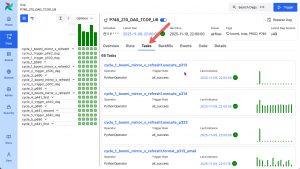
- Web access to the Airflow server for your workloads (read only)
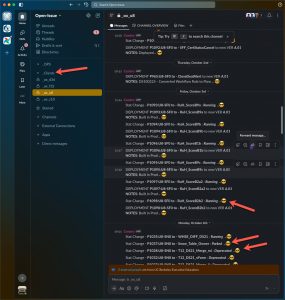
- Slack or MS-Teams “Push” Messaging via our OxFlow Channel
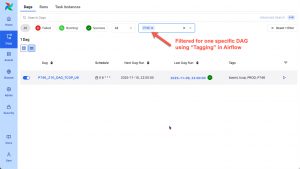
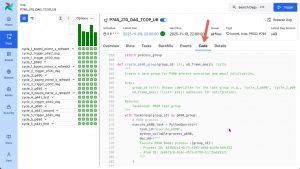
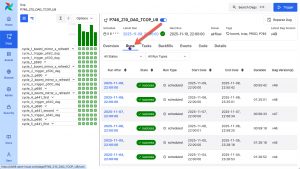
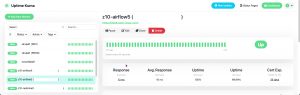
Here are some samples of the Airflow interface you would be able to view:
Here is an example of the Slack interface:
What are some example use cases for OxFlow?
OxFlow task automation can take many forms, from simple to complex. Here we’ve listed a few examples:
- Order Processing
- Connect an eCommerce system to a Database of Record for consolidated reporting
- Aggregate various sales and marketing data sources into a single Dashboard
- Automate payment synchronization from various payment processing sources
- Keep product variants in sync
- Operations
- Automate cross-system synchronization
- Automate provisioning and de-provisioning of user accounts
- Orchestrate operations messaging (email, Slack, etc)
How frequently can an OxFlow job run?
OxFlow tasks can happen as often as every minute. This frequency is a decision that gets made based on a few important considerations:
- Time to complete the task
- Some tasks end up grouping tasks (1 to many) and can be hard to predict in terms of time to complete.
- If a task is variable in its duration of runtime, we’d plan a wider time cycle.
- Example:
- The task takes from 3 to 34 minutes depending on some external factor
- We’d suggest scheduling that task for no more than every 90 minutes
- Business Needs
- The business need should be driving our design and implementaiton.
- Austerity Mindedness
- “Least expensive” is our motto.
- If there is no need for often, lets not schedule it often.
What is the backstory on “OxFlow”?
We, as a team, have worked with Salesforce clients since 2008. We did not build our own Salesforce instance until 2019 (the cobbler’s son never has shoes!) and when we built it we called it “ORG-X” (because we are nerds I suppose).
We intended on using ORG-X not as a CRM, but as a client configuration manager and that we have!
After several years of building out ORG-X we began abbreviating it “Ox” and as we evolved the system’s ability to orchestrate client environments, we’ve decided that Ok is a good nickname.
We also see the Ox as an important creature in our world and modern civilization; a strong and steadfast servant. We’d hope that is how our OxFlow service would be seen by our clients.

We have worked in the data systems space for many years and worked with most middleware and integration tools (SSIS, Mulesoft, Dataloader, Talend, Workato, Boomi, Informatica, dbAMP, Zapier, etc).
We realized our clients automation that work well, and access to a fractionalized technical team for both ongoing maintenance but also change management as their environments change over time.
By working with Airflow we can pass along development cost savings to our clients and focus on maintaining those automations, but also building our understanding of your business and opportunities for new efficiencies.
Our services are a “White Glove” combination of Airflow as a Service, monitoring, and account management which folds in both design assist as well as data systems management guidance when needed.
OxFlow Services
Do you offer any guidance for design and change management of automations?
Yes. Onboarding of a new client involves 10 or more hours of listening to the business needs, assessing the technical requirements, and also guiding clients on how to setup a “Data Team” to enable their business to collaborate with our service team.
We work with our clients’ internal Change Management methods and procedures and aim to make the relationship collaborative but also flexible.
How is this service billed?
We charge a fixed annual flat fee for the core automation service (billed at sign-up) which includes an initial 10 hour design/build engagement and gets you started with some automations.
Snowflake costs are the only variable costs in our service model and often are $0 because we design automations to use our Compute (see terminology section) and only use Snowflake for storage. Our clients have a direct vendor relationship with Snowflake and allow us access for our Airflow service.
We sell consulting hours in time blocks of 5 hours for $600 for change management and new automation builds.
What happens to our code if we cancel the service?
We give it all to you. We maintain all DAG code in a Github repository. When you cancel the service we add you to your specific Github repos as read only then you are free to fork the code and own it.
How are changes to APIs handled?
Vendors control their APIs. Most vendors publish a “Version Life Cycle” (here is Ariflow’s) which gives you visibility into which release versions will be live and maintained, then sunsetted when, etc. The various systems and their APIs all are in a constant state of change. Our operations team monitors all these changes and as we move ahead in any one year, we plan and adapt as needed.
Some API change can be a surprise, and in those cases our developers can react quickly.
How are new automation needs handled?
We charge a flat rate of $1500 for any new automation. That flat fee includes up to 10 hours of consulting to define and implement the automation. If your requirements appear to need more time we will work with clients to scope the automation work as a custom job.
What if our data is not ready or clean enough?
Data is never clean enough. We work with our clients to identify actionable incremental steps to take and always keep in mind that there is a larger, unfolding and evolving, data curation and standards story afoot with which we can help you navigate.
Bringing in automation systems will, indeed, press on governance and standards. We can bring a lot of years of experience in managing those transitions to the services we provide our clients.
How do we get support on the service?
OxFlow clients have 5 methods for getting support:
- “OxBot” which is a real time Slack or Teams channel where you see activity and can ask for certain types of updates.
- Email support with our team
- Weekly Zoom meetings
- Monthly Zoom “Office Hours”
- Emergency Response
Do you offer any training?
All new clients go through an initial training on how to access AirFlow, how to work with our OxBot support tool, and how to participate in monthly office hours.
What do we need to know about your business and systems at the start?
Typical questions from the OxFlow team include:
- Do you already have a middleware or integration tool (e.g.: Boomi, Workato, Informatica, Mulesoft, Zapier, Jitterbit, etc)?
- Which systems will be involved in automation? (e.g.: Salesforce, NetSuite, Blackbaud products, Oracle, DonorPerfect, etc).
- What kinds of data you are looking to work with (e.g.: Companies, People, Product, Orders, Moves-Management, etc)
- Do you already have a “Data Mart”?
- Have you established “rules” for things like:
- Primary keying across systems (e.g.: email address)
- Survival – which system wins with automated updates?
- Do you have an internal “Data Team” already?
What are the normal steps for getting this service?
Setting up a new OxFlow client follows these 5 steps:
- Intake – we talk with you about your systems, goals and the next steps.
- Access – we obtain credentials to the systems involved.
- “Hello” – we build initial Airflow integrations to the systems to confirm we can.
- Design – we design a specific integration and automation plan for you needs.
- Implement – go-live! and we move into ongoing support.
What will change when the pilot program is over?
Pilot program participants will be guaranteed pricing at no more than a 3% annual increase. As this is a pilot program, we are looking to learn from this pilot group what is working and not working, then adjust the offering to improve results. We predict service features will change based on this pilot program and cannot fully predict what those may entail.
Why Open-Issue
Experienced Team
We have been in business for 20+ years and have seen many data system consolidations, conversions, integrations and automations. We’ve worked with most middleware systems and have found Airflow to be the most flexible and performant tool out there.
High Touch
As a business and a technical team, we are all dedicated to providing very high quality service at a great price. We do this by being very focused on one thing – OxFlow task automation with Airflow.
Our ongoing support includes:
- Weekly systems check-ins
- Code and package change management
- Feature design and implementation
- “Sherpa” engineering where we include a technical manager in every engineering call
Managed Technology
We do the following for you, so you and your technical team do not have to:
- Run and maintain multiple Airflow servers
- Manage code and CI/CD for change management
- Work with your systems’ APIs and build and maintain automations
- Guide your technical team on how to continually enhance and optimize automations
Competitive Pricing
Our business values service delivery and operational efficiencies. Most of our clients, in the last 15 years, don’t need constant changes and enhancements to their integration and automations; They need things to be done well and continue to work.
We are offering OxFlow as a white glove service without a direct development interface because most clients don’t need it. That means we can reduce costs for the clients.
We chose a flat rate pricing model because we can sustain that as a business and offer client something they rarely have which is fixed fee services.
Social Good
The Open-Issue team has always had a pro-bono practice and we actively seek out groups that need help where we have capacity to do so at no cost.
Generosity and kindness are core values for our team and we truly enjoy helping others, esp. if it involves data, systems and automation! We hope that these attributes of us as a team and business would be a contributing value to working with us.
OxFlow Terminology
Airflow
Apache Airflow is an open-source workflow management platform for data engineering pipelines. It started at Airbnb in October 2014 as a solution to manage the company’s increasingly complex workflows. Creating Airflow allowed Airbnb to programmatically author and schedule their workflows and monitor them via the built-in Airflow user interface.
Airflow uses directed acyclic graphs (DAGs) to manage workflow orchestration. Tasks and dependencies are defined in Python and then Airflow manages the scheduling and execution. DAGs can be run either on a defined schedule (e.g. hourly or daily) or based on external event triggers.
Please check out this Wikipedia entry for more details.
API
An application programming interface (API) is a connection between computers or between computer programs. It is a type of software interface, offering a service to other pieces of software. A document or standard that describes how to build such a connection or interface is called an API specification. A computer system that meets this standard is said to implement or expose an API. The term API may refer either to the specification or to the implementation.
In contrast to a user interface, which connects a computer to a person, an application programming interface connects computers or pieces of software to each other. It is not intended to be used directly by a person (the end user) other than a computer programmer who is incorporating it into software. An API is often made up of different parts which act as tools or services that are available to the programmer. A program or a programmer that uses one of these parts is said to call that portion of the API. The calls that make up the API are also known as subroutines, methods, requests, or endpoints. An API specification defines these calls, meaning that it explains how to use or implement them.
Please check out this Wikipedia entry for more details.
Compute
Compute is a generic term used for when costs are incurred for use of a CPU or processor you have “rented” via your Cloud service provider. Different providers measure “Compute Cost” in different ways (by the hour, by the minute, etc). Part of our OxFlow service is a way to centralize “Compute” cost on our low-cost servers and avoid your providers’ more expensive “Compute” fees.
Please check out this Snowflake Article for some examples of how this cost is metricized by providers.
Data Mart
We use this term to describe how we employ the Snowflake component of our service offering. Often times we need to index, modify and possibly transform data for reporting purposes so we employ Snowflake, a lightweight low cost secure database “in the sky”, to maintain certain indexes and tables, allowing our OxFlow task automation service to do better work more efficient work.
Part of our Data Mart model is to build “Mirror” autmations where/when needed. This is where we pull an index from one or severl systems to allow for advanced data transformation in Snowflake – and significantly enhance the ability of a task automation service to provide reporting and math in ways no single system can.
When we setup a Snowflake Data Mart for a client, we guide the client through provisioning a Snowflake instance directly (client owns the account and is invoiced directly) then we install our Data Mart “footprint” which includes: databases, schemas, roles, security model and security policies.
Please check out this Wikipedia entry for more details.
DAG
Directed Acyclic Graph; a series of linear tasks being executed by Airflow.
Geek answer: In mathematics, particularly graph theory, and computer science, a directed acyclic graph (DAG) is a directed graph with no directed cycles. That is, it consists of vertices and edges (also called arcs), with each edge directed from one vertex to another, such that following those directions will never form a closed loop. A directed graph is a DAG if and only if it can be topologically ordered, by arranging the vertices as a linear ordering that is consistent with all edge directions.
Please check out this Wikipedia entry for more details.
Endpoint
This is the term we use to identify a specific system to which we connect via API. For example, if you have 5 systems we are “talking to” with Airflow, we’d say you have 5 endpoints.
Please check out this Wikipedia entry for more details.
OxBot
OxFlow is a task automation service, so people want to know “is it running” and “when did it run”. We deliver ongoing status and activity information to our clients via Slack or Teams, and we call that “OxBot”.
OxBot is mostly a “Push” concept (we push you updates), but OxBot also has “Pull” features allowing you to ask questions like:
- Status of my automations
- Details about how automations work
- Schedules
- Access to Playbooks
Snowflake
Snowflake Inc. is an American cloud-based data storage company. It operates a platform that allows for data analysis and simultaneous access of data sets with minimal latency. It operates on Amazon Web Services, Microsoft Azure and Google Cloud Platform. As of November 2024, the company had 10,618 customers, including more than 800 members of the Forbes Global 2000, and processed 4.2 billion daily queries across its platform.
Please check out this Wikipedia entry for more details.
Task
When we refer to a “Task”, we are describing an Airflow DAG Task – or step in a series of steps (See DAG in terminology, above). Because Airflow allows for running of Python, SQL or external actions using connectors and operators, an Airflow Task could include things like:
- Python code executing a program
- Python code executing SQL
- Execution of SQL (without Python)
- Execution of Stored Procedures
- Any many many more 🙂